The screen recorder that doesn't bill you for viewers.
Record your screen and camera, get a link the second you stop. Teammates, viewers and AI agents all watch free.
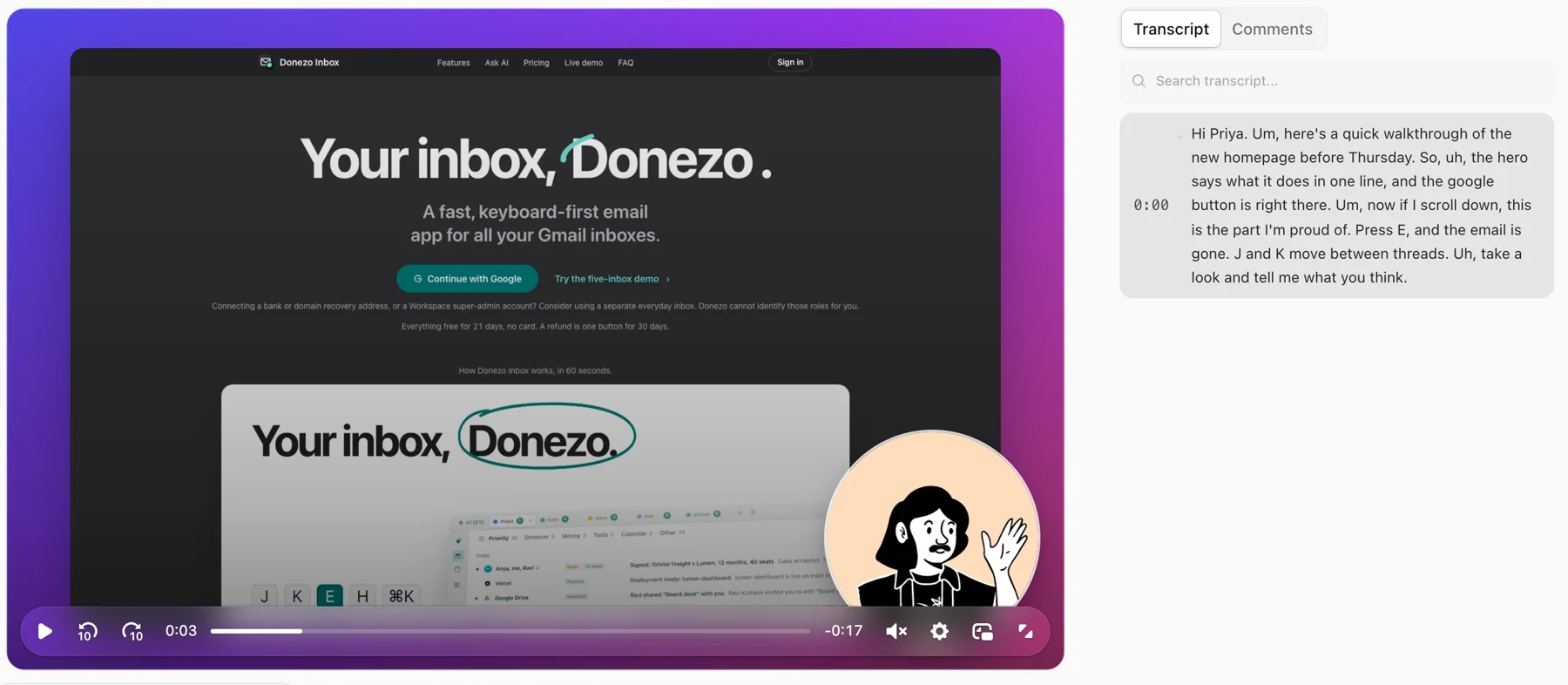
Viewers never need an account
Watching, reacting and replying is free and sign-up free. So is every member you invite.
Built for agents too
They upload a recording and get a link, or read any video as a transcript and a brief.
Bring your Looms
Paste public links, or use the extension for private ones. Old Loom links open the copy.
From “let me show you” to a link in one click.
Record
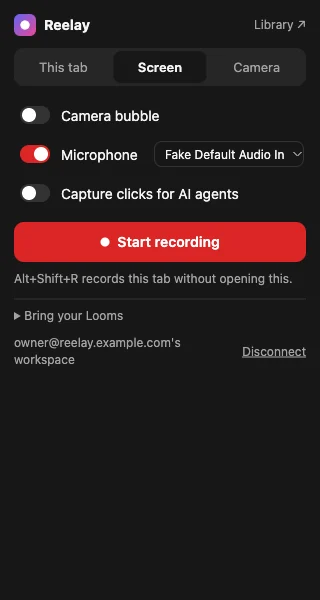
Pick a tab, a window or your whole screen, from the page or the Chrome toolbar. Your camera floats over it and the video uploads as you talk.
Stop
The link is already on your clipboard. A transcript lands seconds later, with a title, summary and chapters on paid plans.
Share
They watch at 2x, react at the exact moment and reply without signing up. You see who got to the end.
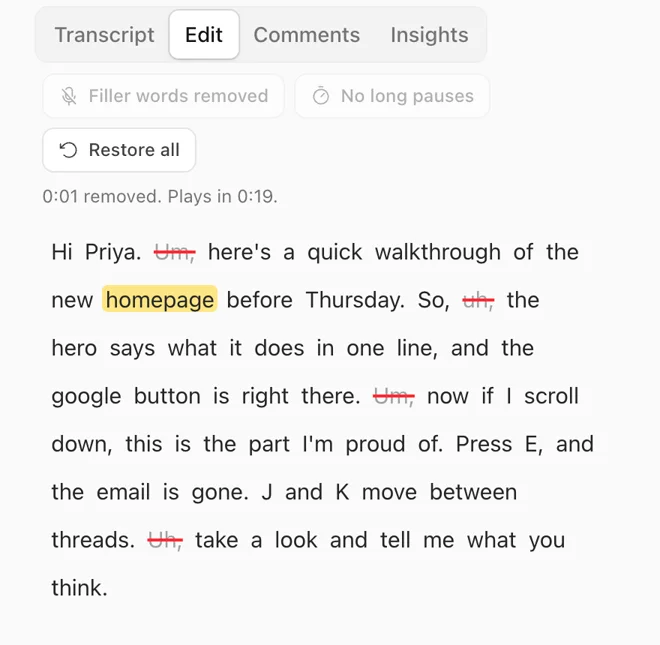
Edit the video by editing the words.
Select a sentence and cut it. Clear every “um” and long pause in one click. Your original stays untouched, and it's included on every plan, not a $24 add-on.
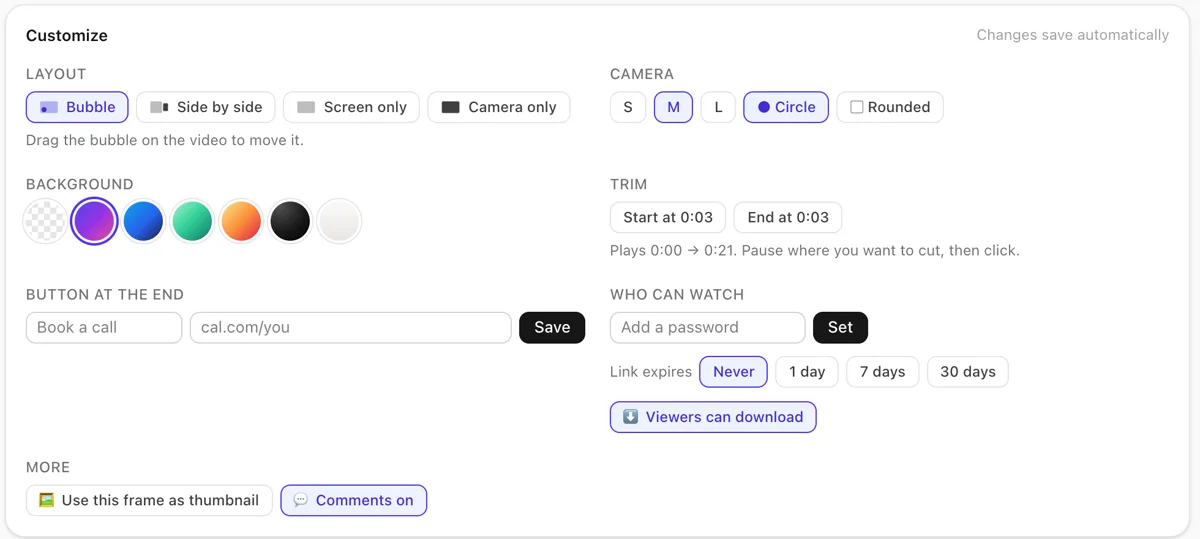
Decide how it looks after you've recorded.
Your camera is recorded on its own track. Move the bubble, go side by side, drop your screen on a gradient, trim the ends, point at things with arrows and boxes, pick karaoke captions, and add a button that books the call.
A link that moves, even in email.
Every video gets an animated preview. Paste the link into an email and the thumbnail plays in the inbox, so people click because they've already seen the first seconds.
One click on Share → Copy for email. Slack and Notion unfurl the player instead.
To: Priya · Subject: Walkthrough of the new homepage
Hi Priya, quick walkthrough before Thursday. Three minutes:
 3:12
3:12▶ Watch “Quick walkthrough of the new homepage”
Made for people and the agents they work with.
Show an agent what you want and it can read it. Let an agent show you what it did and you can watch it. No computer use needed: a browser agent already has video from Playwright, and a desktop agent from ffmpeg.
You record, the agent reads
Share → Copy for an AI agent gives a Markdown brief: what you said, in order, with timestamps. With the extension's click capture it also lists the pages you opened and the buttons you pressed.
# Quick walkthrough of the new homepage
Video: …/ab12cd34 (3:12)

## What happened on screen
[0:02] Opened /pricing
[0:09] Clicked “Annual” `button[role="tab"]`

## Transcript
[0:00] Hi team. Um, so this is the new billing screen…
The agent records, you watch
Create an API key, connect the MCP server, and any agent can upload a recording and hand you the link. It can also search your videos and comment at a timestamp.
claude mcp add --transport http vertov \
  https://YOUR-HOST/mcp \
  --header "Authorization: Bearer rk_…"

# or from any script
curl -X POST 'https://YOUR-HOST/api/v1/videos' \
  -H 'Authorization: Bearer rk_…' \
  -H 'Content-Type: video/webm' \
  --data-binary @recording.webm
Tools: upload a recording, copy a video from a URL, list and search, read a video, get it as a brief, comment, list spaces.
Record from the toolbar.
- Record this tab or your whole screen. Alt+Shift+R starts and stops.
- Your camera shows as a bubble on the page you're recording. Draw on it with a pen that fades, and highlight your cursor.
- Optional click capture, so a coding agent can follow what you did. It never records what you type.
- Private Looms copy over with your own Loom sign-in, and old Loom links open the copy for anyone who has the extension.
A Chrome Web Store listing is coming. For now: unzip it, open chrome://extensions, turn on Developer mode and choose Load unpacked.
The parts people wish Loom had.
A bad connection can't lose your take
Every second is saved in your browser until the upload is confirmed. Crash, reload, upload it again.
Passwords, expiry, members only
Lock a video, let the link die after a week, or keep it inside the workspace.
See who watched, and how far
Per-viewer progress, so you know they got to the part that matters.
Replies pinned to the moment
Timestamped comments and emoji reactions that replay for the next viewer. Nobody has to sign up to leave one.
Annotate, caption, combine
Drop text, boxes and arrows on any moment. Pick bold or karaoke captions. Join several videos into one, with chapters for each clip.
Workspaces that don't bill per head
Spaces, folders and roles for the whole team. Members and viewers cost nothing.
An MP4 with your face in it
Download the finished layout, background and cuts included, ready for YouTube or a deck.
Plays inside Notion and Slack
Paste the link and it unfurls into a player. Embed code for everywhere else.
Vertov and Loom, side by side.
| What you get | Loom | Vertov |
|---|---|---|
| Length of a free recording | 5 minutes | No limit per video |
| Free storage | 25 videos per person | 5 hours of video, any length |
| Teammates who only watch | Paid seats once Creator Lite ends | Free, no account needed |
| A 10-person team with AI features | $240 a month ($24 × 10) | $29 a month for the whole workspace |
| Remove filler words and pauses | Business + AI, $24 per user/mo | Included on every plan |
| Edit by transcript | Business + AI, $24 per user/mo | Included on every plan |
| Record for AI agents | Business + AI, Mac app or Chrome extension | Included: API, MCP server and a Chrome extension |
| Download your videos (free) | Not included | Included |
Loom details from loom.com/pricing and Atlassian's billing notice, checked November 1, 2026. Our plans are the ones listed under Pricing; during early access nothing is limited yet. Loom is a trademark of Atlassian; Vertov isn't affiliated with it.
Priced by hours of video, never by seat.
A plan covers the whole workspace. Invite everyone, share with anyone. You only pay for how much video you keep.
Early access: billing opens soon. Until then every account is free, with no limits.
Free
$0 /month
5 hours of video
- Every recording and editing feature
- Transcripts and captions
- No cap on a single video's length
- Downloads and MP4 export
Pro
$9 /month
50 hours of video, or $90 a year
- Everything in Free
- AI titles, summaries and chapters
- Room for a real library
Team
$29 /month
200 hours of video, or $290 a year
- Everything in Pro
- A shared library for the whole team
- Members and viewers always free
Business
$99 /month
1,000 hours of video, or $990 a year
- Everything in Team
- A thousand hours for larger teams
Need more room? Add 50 hours for $5 a month, as many times as you like. Pay yearly and get two months free. If a library fills up, new recordings wait until you add hours or make room; nothing is ever deleted for going over.
Start recording freeQuestions
Is Vertov really free?
Yes, while we're in early access: every account is free with no limits. When billing opens, the free plan keeps 5 hours of video with no cap on how long a single video can be. People who only watch, react or comment are always free, and so is every member you invite.
Do viewers need an account?
No. Anyone with the link can watch, react and comment with just their name. You can add a password, an expiry date or a members-only setting when a video shouldn't travel.
How do AI agents use it?
An agent that already has a video, from Playwright's recordVideo, a screencast or ffmpeg, uploads it with an API key and gets a share link back. Agents can also read any video as a transcript and a brief, add timestamped comments, and search your library. There's an MCP server for Claude Code, Cursor and others. No computer use is needed to record.
What does the Chrome extension add?
Recording any tab or your screen from the toolbar at 720p, 1080p, 4K, square, vertical or a custom size, a camera bubble with a blurred or replaced background, a pen on the page you're recording, an option to let viewers watch live and rewind while you're still recording, and an optional mode that logs the pages you open and the buttons you click, so a coding agent can follow exactly what you did. It also sends old Loom links to their copies and copies private Looms using your own Loom sign-in.
What can I put on top of a video?
Text, boxes, arrows and clickable links that show for the seconds you choose, plus styled or karaoke captions. Downloads and exports have the annotations and captions burned in, so they look the same everywhere. You can also add a button at the end and combine several videos into one.
Can people watch while I'm still recording?
Yes, if you turn on live viewing in the extension. Anyone with the link sees the recording a few seconds behind, can rewind to the start, and jumps to the live edge with one click. When you stop, the link turns into the normal video.
Can I bring my Loom videos?
Paste public Loom links and we copy each video over with its title, then transcribe it. With the Chrome extension, private Looms come over too. Once copied, anyone with the extension who opens the old Loom link lands on the new video.
What happens to free videos nobody watches?
On the free plan, a video nobody but you has watched for 90 days is flagged. We email you 30 days before it goes and again a week before, and you can keep it with one click or download it. Paid plans keep everything for as long as you subscribe. Nothing is ever deleted without both warnings.
What if my upload fails halfway?
Your recording uploads while you talk, and a copy stays in your browser until the server has all of it. If the tab crashes or the Wi-Fi drops, open the recorder and upload it again.
Can I host it myself?
That's the plan. It runs on Cloudflare Workers, R2 and D1, so you can run it in your own Cloudflare account and pay Cloudflare directly. We're preparing the open-source release; until then the hosted version is the one to use.
Where are my videos stored?
On Cloudflare's network, served from the edge close to your viewers. You can download every original file from your library at any time.
Your next walkthrough takes one click.
No download needed, no card, no seat count.